What is ECCS Cloud Email?
The ECCS Cloud Email is the email system of the University of Tokyo, which is linked to your UTokyo Account. It grants you access to the Google Workspace for Education, a suite of Google services such as Gmail and Google Drive.
If you have obtained a UTokyo Account, please make sure that your ECCS Cloud Email account is set up and ready to use, even if you already have a personal Google account. This is because some university pages and files are configured to allow access only through an ECCS Cloud Email account.
Your ECCS Cloud Email address (aka username) follows the format xxxx@g.ecc.u-tokyo.ac.jp.
When setting up of your account, you can choose an appropriate name to appear before the “@” symbol.
If you do not specify one yourself, your email address will automatically be set to “your 10-digit Common ID+@g.ecc.u-tokyo.ac.jp”.
For more details, please refer to the page
“Restrictions and specifications regarding email addresses (in Japanese)”.
Steps to Start Using Your ECCS Cloud Email
To use your ECCS Cloud Email (and complete the initial account setup), you need a UTokyo Account. If you have not yet used your UTokyo Account, please refer to the page “How to start using UTokyo Account” first.
How to Set Up Your Own Email Address
Note: Even if you are already using your ECCS Cloud Email, you can still change your email address by following the same steps outlined below.
- Access the UTokyo Account User Menu and sign in with your UTokyo Account.
- Click “ECCS Cloud Email (mail address)” on the left to open the email address setting page. Enter your preferred username in the “Email Address” field and click “SAVE”.
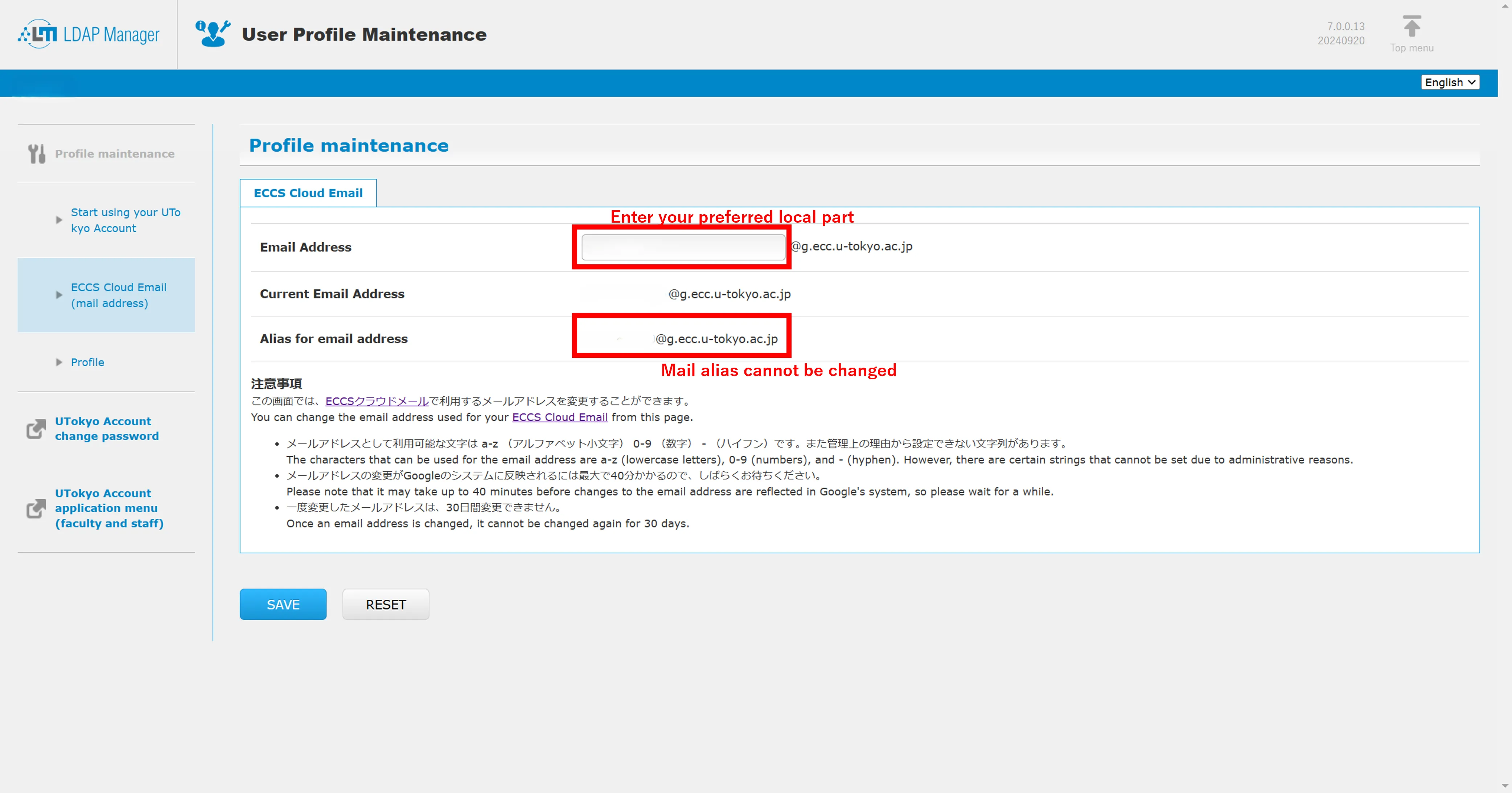
After setting your email address, it may take up to about 40 minutes for the change to take effect. Please wait for it to update before logging in.
Log In to Check
- If you set your email address of your own, please wait about 40 minutes for your newly set email address to be reflected in the system.
- Go to the Google login page.
- If you have set an email address of your own, please enter that email address, otherwise enter “10-digit common ID +
@g.ecc.u-tokyo.ac.jp.” - Unless you have already signed in to UTokyo Account, the UTokyo Account sign-in page will be displayed. Please sign in. For username, please enter “10-digit common ID +
@utac.u-tokyo.ac.jp”.
Available Services and How to Use Them
Gmail
Gmail is a web-based email service that allows you to use your University of Tokyo email address (xxxx@g.ecc.u-tokyo.ac.jp).
- For basic usage instructions, please refer to Google’s official Help pages and the article “9. Email (in Japanese)” in the Hyper Workbook.
- If you have not received an email you are expecting, please refer to Google’s Help page “Gmail messages are missing” and follow the suggested steps to resolve the issue.
Google Drive, Google Docs, Google Sheets, Google Slides, and Google Forms
Google Drive is an online storage service where you can store and/or edit various types of files. In addition to common file formats such as PDFs, you can also store and edit files in Google’s own formats, such as Google Docs and other Google Workspace files.
- For basic instructions on how to use Google Drive, please refer to Google’s official Help pages and the “Google Drive” page.
- For information on using the Shared drives feature in Google Drive, please refer to the Shared drives page.
- For basic instructions on how to use Google Docs and other related services, please refer to Google’s official Help pages and the Google Docs page (in Japanese).
- Tutorials
- “Good Practices in Online Teaching” (Kayoko Kurita) (in Japanese) : This is an example of a class where Google Slides was used to facilitate group work, as part of creating an effective “learning environment”.
- Online Class Information Exchange Meeting, Session 11 - Tools for Online Classes (1) (in Japanese): This recorded session introduces a script (a simple program) that automates the process of creating multiple copies of a template file for use in group work.
- Conducting Quizzes and Surveys with Google Forms: This article explains the basics of using Google Forms, focusing on use cases such as quizzes and surveys.
Google Meet
For basic instructions on how to use Google Meet, please refer to Google’s official Help pages and the Google Meet page.
Google Groups
By registering multiple Google accounts in a Google Group, you can exchange messages in a manner similar to a mailing list, and also manage file sharing and access permissions collectively.
For basic instructions on how to use Google Groups, please refer to Google’s official Help pages and the Google Groups Usage page (in Japanese).
Google Calendar
Google Calendar is an online calendar service that can be used to manage your schedule.
- For basic instructions on how to use Google Calendar, please refer to Google’s official Help pages and the Google Calendar Usage page (under construction).
- For examples of how to use this service, please refer to the article on collaboration using Google Calendar.
YouTube
YouTube is a video streaming service.
- For basic instructions on how to use YouTube, please refer to Google’s official Help pages.
- Tutorials
Google Classroom
Google Classroom is a learning management system provided by Google.
- For basic instructions on how to use Google Classroom, please refer to Google’s official Help pages and the Google Classroom page (under construction).
- Though is possible to create multiple classes with the same name, users who are enrolled in multiple classes with identical names may find it difficult to distinguish between them. Therefore, when creating a class, please make sure to give it a name that participants can easily recognize and distinguish from other classes.
- Tutorials
- Online Class Information Exchange Meeting, Session 14 — Tools for Online Classes (3): Google Classroom (in Japanese): Video and other materials regarding the use of Google Classroom in course instruction. (Please note that the video is available only to members of the University of Tokyo.)
Google Assignments
Google Assignments is an assignment management system that is most effective when used in conjunction with other learning management systems.
For basic instructions on how to use Google Assignments, please refer to Google’s official Help pages and the Google Assignments page (in Japanese).
Gemini
Gemini is Google’s generative AI service. As of September 2024, when using Gemini with an ECCS Cloud Email account, user data is not used to improve AI models, nor is it subject to human review for the purpose of model improvement.
For basic instructions on how to use Gemini with an ECCS Cloud Email, please refer to the page on Using Gemini with an ECCS Cloud Email (in Japanese) and Google’s official FAQ page.
Other Examples of Services
- Google Keep
- Google Chrome Sync
- Google Travel
- Google Sites (in Japanese)
- Google Contacts
- Google Photos
- Blogger
- Google Analytics
- Google Cloud Console
- Google Chat
- Notebook LM
Additional Information
For more information on these services, please refer to other information regarding the use of ECCS Cloud Email (in Japanese).